

Sessions
The Sessions tab displays a list of your currently saved Filmstro sessions. You can open each one to continue editing as well as renaming, duplicating and deleting them.
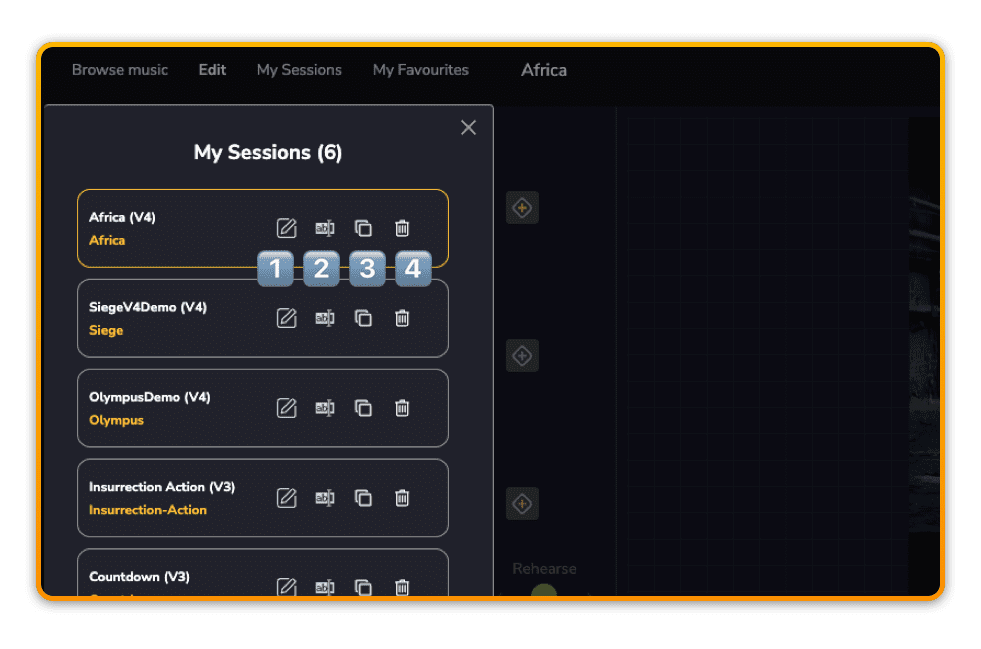
1️⃣ Continue Editing
Simply click the pen icon to open an existing session
2️⃣ Rename
Click the rename icon to choose a new name for your project. Please note that each session requires a unique name.
3️⃣ Duplicate
To save a duplicate session in order to carry out some other edits while keeping your original work separate, you can use the duplicate icon to create another identical session. You will be prompted to choose a new name, and once saved, this will also appear in your sessions tab.
?This is not a ‘save as’ command. Please note that you will need to open the newly duplicated session from your sessions folder.
4️⃣ Delete
To keep things organised and tidy you can also delete any sessions. Please note that this is a permanent action and cannot be undone.