

Music Length
The Music Length settings preferences allow you to make changes to the algorithm’s behaviour when changing the music to your desired custom length.
Match Type
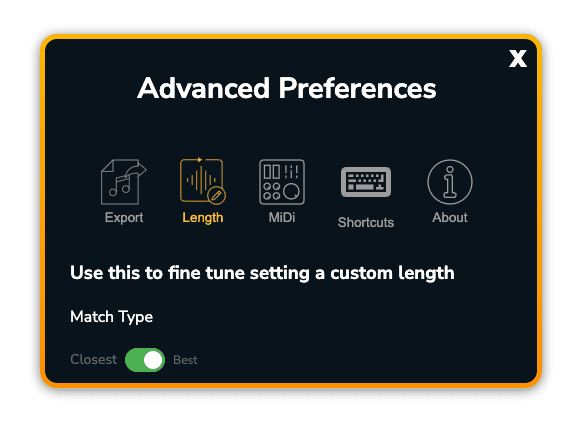
The Match Type determines which of 2 distinct algorithms is used to create your custom length.
Best Match
By default Filmstro Pro uses Best Match. We recommend you use this for the majority of your custom music edits. It produces the best possible music that has the highest musical integrity due to the algorithm’s prioritising of the musical phrasing and the protection of musical elements.
Best Match will produce a custom length typically within +/- 1 second of your desired custom length.
Closest Match
Closest Match is an alternate algorithm designed for when you need the music length to be incredibly close to your desired length within a negligible margin of error.
Closest Match will produce a custom length typically within +/- 0.3 seconds of your desired custom length.
?Please note that you will rarely need to use this match type due to the way custom lengths are impacted by the music’s Audio Tail.
Audio Tail and Custom Lengths
An audio tail is the natural fade out of the music at the end of a track. Audio Tails vary in length and intensity depending on the individual track’s instrumental palette and arrangement and on the current Scoring Slider position (e.g. maximum Power vs. minimum Power).
?The presence of an audio tail means that setting a custom length for the music to be the exact same length of your video edit using Closest Match is rarely necessary.
Instead we recommend synchronising the musical ending of the track with your video edit while in Best Match and tweaking the length until you achieve a perfect sync point. You can always trim any excess audio tail in your NLE in the final edit.
Transition Type

Transition types determine the way in which the algorithm deals with the musical material when creating your custom length. By default this is on the most appropriate setting but you can change the transition type on a per-track basis if you want to experiment with a different result. Below you can learn more about what’s recommended:
Small
This setting is most useful for music that has hard/sharp transients and very rhythmic content such as fast drum parts and percussive synth elements. This applies most to our music in the electronic/digital categories.
Medium
This setting is most useful for music that has relatively sharp transients but also some more smooth transients due to melodic elements such as electric guitar riffs and longer cymbal crashes. This applies most to our music in the Amped category.
Large
This setting is most useful for music that has relatively smooth and complex transients due to more complex elements such as acoustic piano, guitar and vocal parts. This applies most to our music in the Acoustic category.
Extra Large
This setting is most useful for music that has very complex, layered or diffuse transients due to the amount of imaging present in the mix and the very full instrumental palette involved. This applies most to our music in the Cinematic category.
Cut Downs

The Cut Down settings preference determines the way in which the audio-engine handles very short custom lengths.
The default algorithm prioritises musical integrity. The Short setting prioritises the shortest possible custom lengths.
If you choose a custom length of ~30 seconds or below while Default is selected, you may see a warning notification in the App. By choosing the Short setting you can achieve a slightly shorter version once you set a new custom length.
?If you need music that is significantly shorter than 30 seconds then please remember that each track contains an Audio Tail. This means that – in practice – if you want a piece of music to be ~15 or ~20 seconds long, you actually need to set the actual custom length in the App closer to ~25 or ~30 seconds.